How POS webhooks sync your restaurant data in real time
Understand how POS webhooks sync restaurant data in real time. Learn about event-driven mechanics, security best practices, and reliable integration methods.
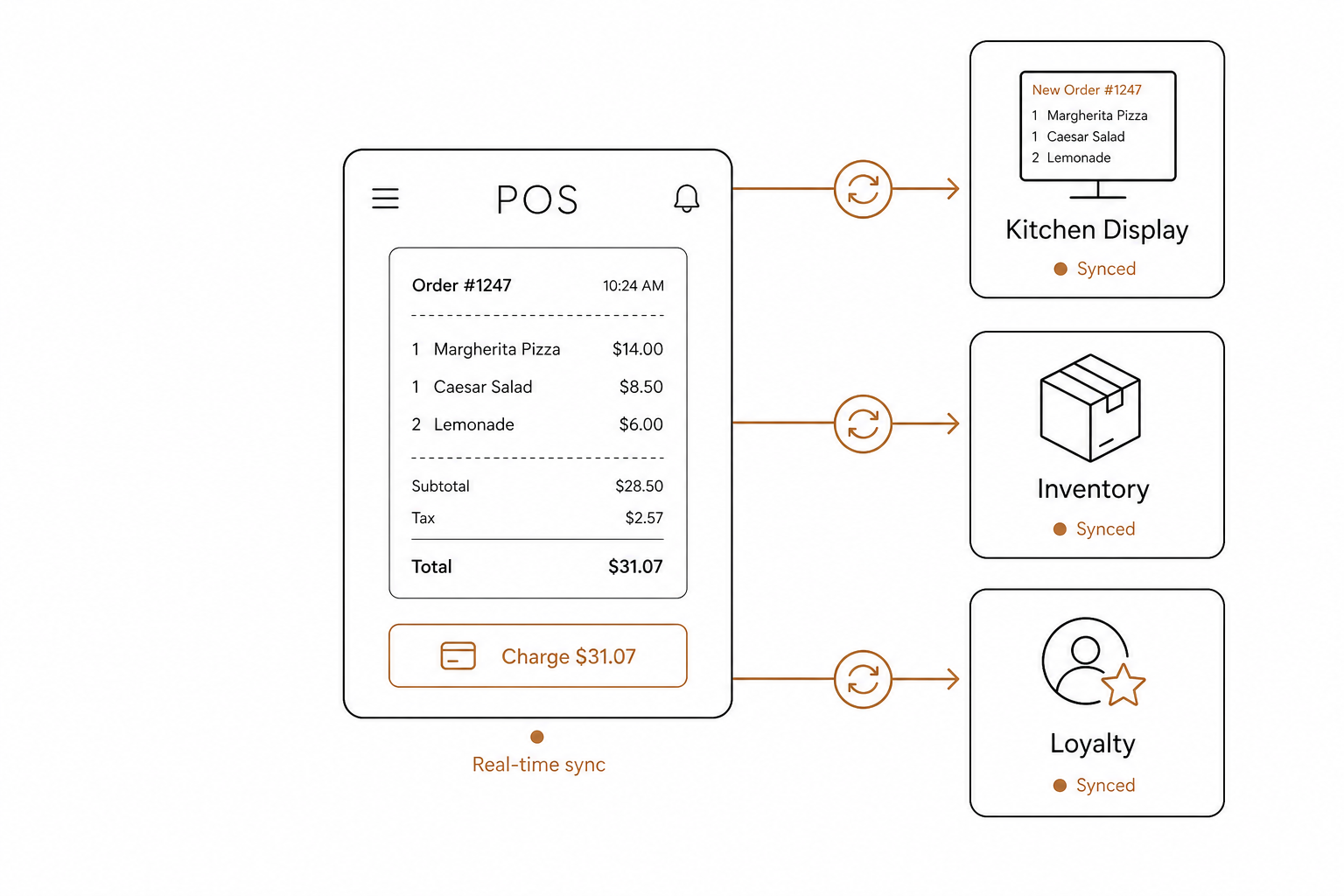
Managing a modern restaurant requires multiple software systems to work in perfect harmony. When a customer places an order, your kitchen display, inventory tracker, and loyalty program all need to know about it instantly. If your systems rely on slow, manual updates, your operations will lag.
This is where point-of-sale (POS) webhooks become essential. They act as the nervous system of your digital restaurant, sending data exactly where it needs to go, the millisecond an event occurs.
What is a POS webhook?
A webhook is an event-driven callback that automatically pushes data from your POS system to another application the moment a specific event occurs.
Unlike traditional APIs that require pull-style polling – where your application repeatedly asks the POS if anything has changed – webhooks operate on a push model. According to Mulesoft's webhook guide, webhooks allow a server to deliver data to other applications immediately when it becomes available. This saves server resources and eliminates unnecessary API traffic.
[ Customer Places Order ] ──> [ POS System ] ──(HTTP POST Event Payload)──> [ Third-Party App ]
When an event triggers – such as a paid transaction, a menu modification, or a shift update – the POS system bundles the event data into a structured payload. This payload, typically formatted in JSON, is sent via an HTTP POST request to a pre-configured destination URL known as the webhook receiver.
The mechanics of event-driven synchronization
To understand how webhooks streamline daily operations, look at how an online order flows through a connected ecosystem:
- The event occurs: A customer places an order via a mobile application or third-party delivery service.
- The POS processes it: A modern point-of-sale platform, such as Spindl, receives and registers the transaction.
- The webhook fires: Spindl instantly sends an HTTP POST request containing order details – such as items, payment status, and customer notes – to the restaurant's third-party marketing software.
- The receiver acts: The marketing platform processes the payload in real time to calculate and assign loyalty points, sending a confirmation SMS to the customer within seconds.
This instantaneous push mechanism eliminates the latency associated with traditional polling, drastically improving operational speed.
Best practices for secure POS webhook implementation
Because webhooks transmit sensitive operational data and customer identifiers over the public internet, security cannot be an afterthought. When building or consuming webhook integrations, developers must follow strict security guidelines to protect their systems.
Enforce HTTPS encryption
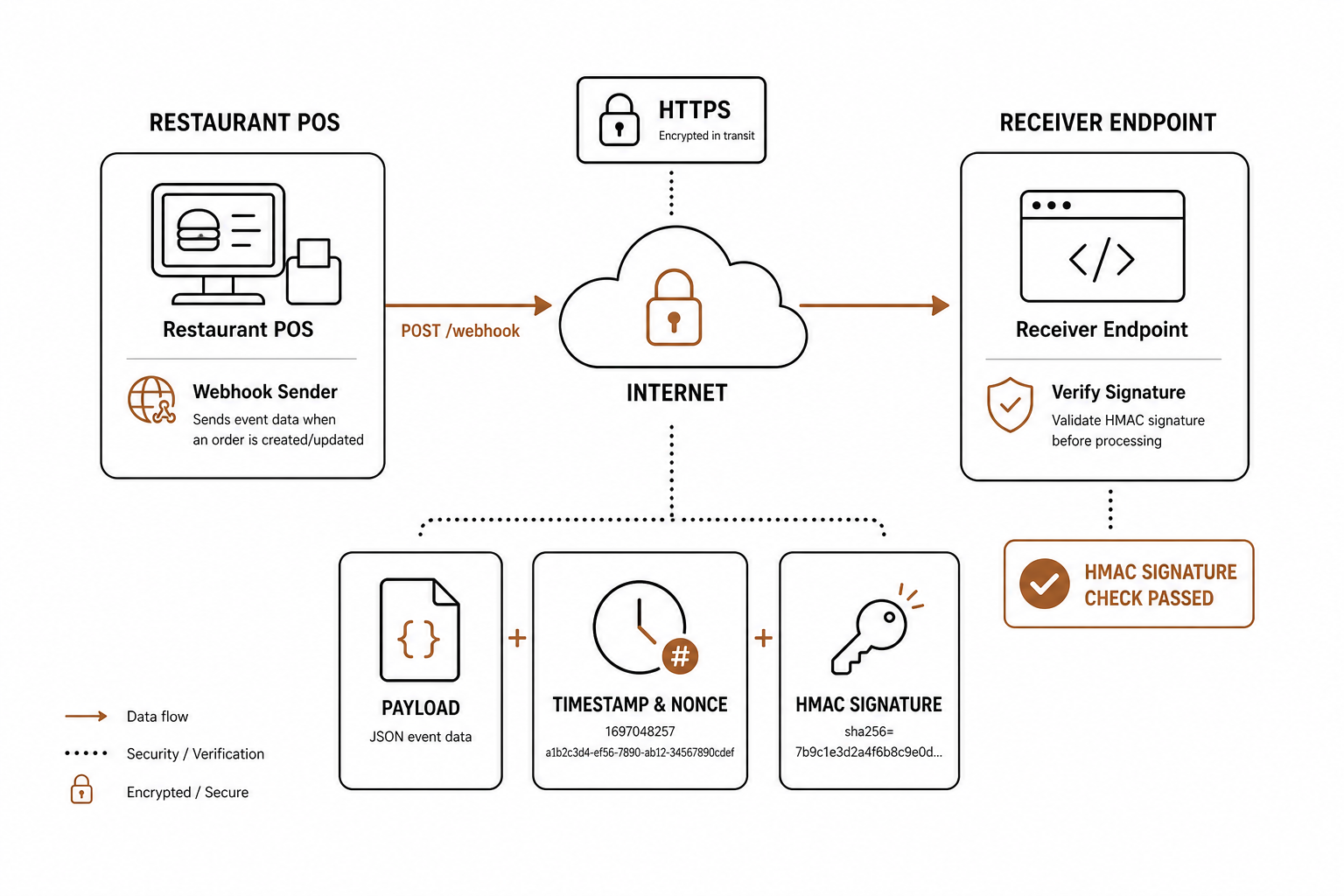
Always configure webhook destination URLs to use HTTPS. According to Snyk's webhook security guidelines, HTTPS ensures that all payload data is fully encrypted in transit, protecting your POS data from eavesdropping and man-in-the-middle attacks.
Verify webhook signatures
To prevent unauthorized parties from sending spoofed data to your receiver URL, you must verify the source of every payload. Your POS system should sign requests with an HMAC (Hash-based Message Authentication Code) cryptographic signature. The receiver can then calculate its own hash using a shared secret token and verify it against the incoming header to confirm the payload is authentic and untampered with.
Mitigate replay attacks
Verify timestamps or nonces included in the webhook metadata. According to Hookdeck's security checklist, checking these values allows receivers to enforce short validity windows. This blocks malicious actors from intercepting and replaying historical webhook requests.
Minimize payload exposure
Avoid sending highly sensitive data, such as passwords, raw credit card details, or excessive personally identifiable information (PII), in the raw webhook payload. Instead, design payloads to carry minimal unique identifiers. The receiving application can then use those secure IDs to retrieve detailed, sensitive data directly from a secured POS API endpoint.
Building a reliable webhook receiver
Webhooks rely on the public internet, which means network drops, system timeouts, and sudden traffic spikes are inevitable. To keep your data in sync under real-world conditions, you must implement resilient integration patterns.
Process webhooks asynchronously
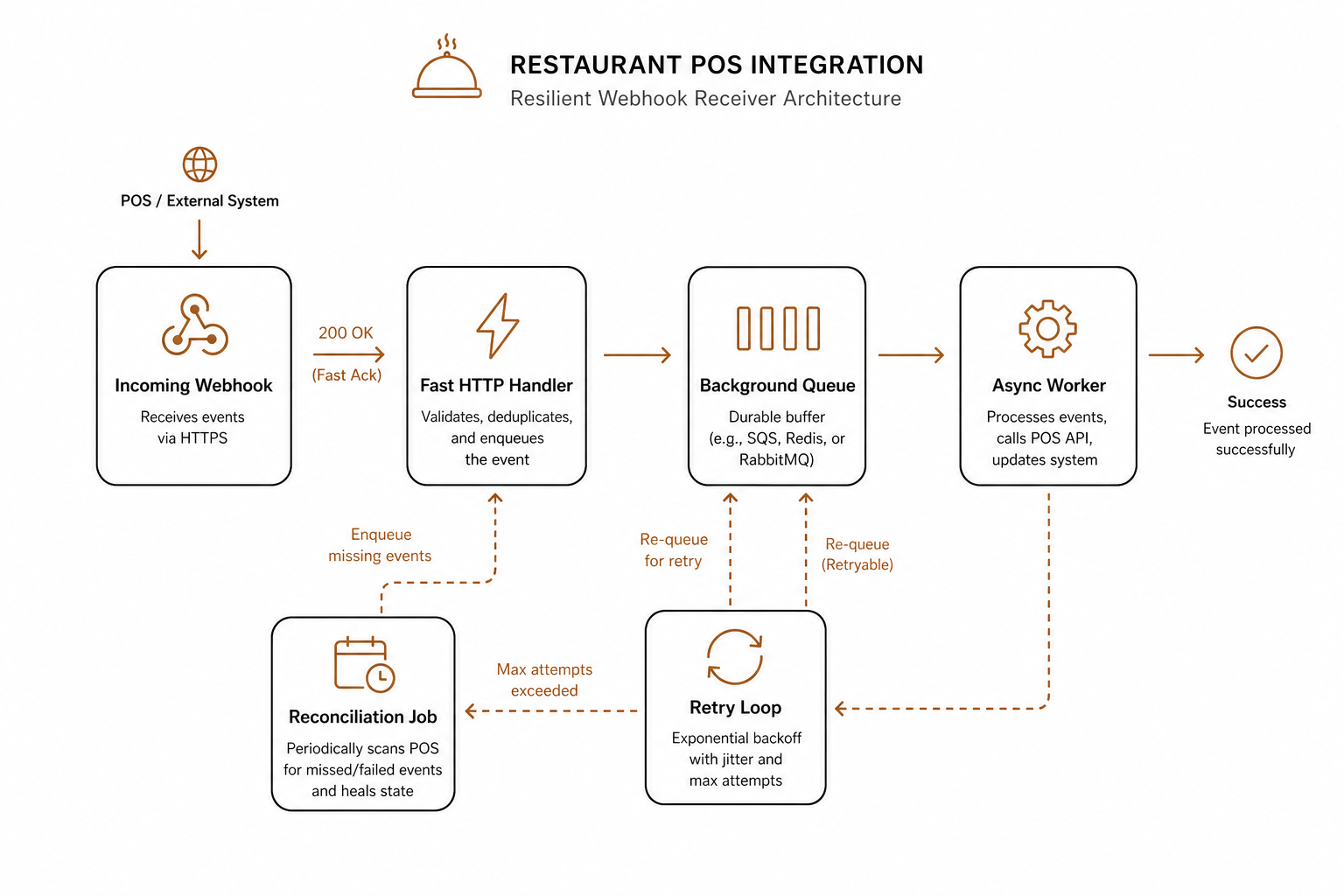
When your receiver endpoint gets a webhook request, do not execute complex processing logic synchronously within the HTTP handler. Instead, parse the request, save the event to a background message queue (like RabbitMQ or Amazon SQS), and immediately respond to the POS with an HTTP 200 OK status code.
As outlined in Shopify's webhook developer documentation, deferring heavy database processing to asynchronous background workers prevents your receiver from timing out and triggering unnecessary, duplicate retry cycles from the sender.
Incoming Webhook ────> [ Fast HTTP Handler ] ──(Respond 200 OK)──> POS (Done)
                             │
                     (Enqueue Event)
                             ▼
                    [ Background Queue ] ──> [ Asynchronous Worker ]
Design for at-least-once delivery (idempotency)
Most robust webhooks guarantee at-least-once delivery. This means network glitches can occasionally cause the same event payload to be delivered multiple times. Ensure your webhook handler is idempotent, meaning processing the same payload twice does not result in duplicate actions, like double-charging a customer or duplicating a kitchen ticket. Use unique event IDs or idempotency keys provided by the POS to identify and silently discard duplicate events.
Handle response codes appropriately
Your POS will evaluate HTTP status codes to determine delivery success:
- 2xx codes: Indicate successful delivery. No retries will occur.
- 5xx codes or timeouts: Indicate a transient server failure. This will trigger the POS to retry sending the payload, ideally using an exponential backoff strategy.
- 4xx codes: Indicate client-side configuration errors (such as a bad request or missing resource) and typically should not trigger automated retries.
Implement a fallback reconciliation job
No webhook delivery system is completely foolproof. Due to prolonged server outages or network drops, some events may fail to reach your application. To maintain strict data integrity, always schedule a periodic pull-style reconciliation job (such as once every 24 hours) to fetch historical logs directly from the POS API and verify that no real-time webhook payloads were missed.
Real-time operations with modern POS integration
Building an integrated restaurant workflow requires a core POS system engineered for modern API connectivity. Traditional, legacy POS systems act like rigid, siloed hardware. In contrast, modern platforms like Spindl function more like an iPhone – highly intuitive, completely integrated, and built to connect effortlessly with delivery platforms, self-service kiosks, and third-party software in real time.
Once you have real-time data streaming out of your POS via webhooks, you can take automation a step further by connecting those events to artificial intelligence.
The AgenticPOS MCP server connects directly to your point-of-sale system, allowing you to run your restaurant operations by simply talking to an AI agent. By exposing over 140 tools across menu management, shift scheduling, real-time analytics, inventory tracking, and multi-location updates, AgenticPOS plugs directly into platforms like Claude, ChatGPT, or Slack.
Instead of navigating dozens of separate web dashboards, you can configure granular user tokens and orchestrate complex back-office tasks through simple, natural language chat. Explore how to connect your restaurant systems and begin managing your operations with the power of conversational AI.