How to integrate POS with accounting to stop manual errors
Learn how to integrate your POS with accounting software to stop manual errors. Automate sales, tax, and payroll tracking for real-time financial accuracy.
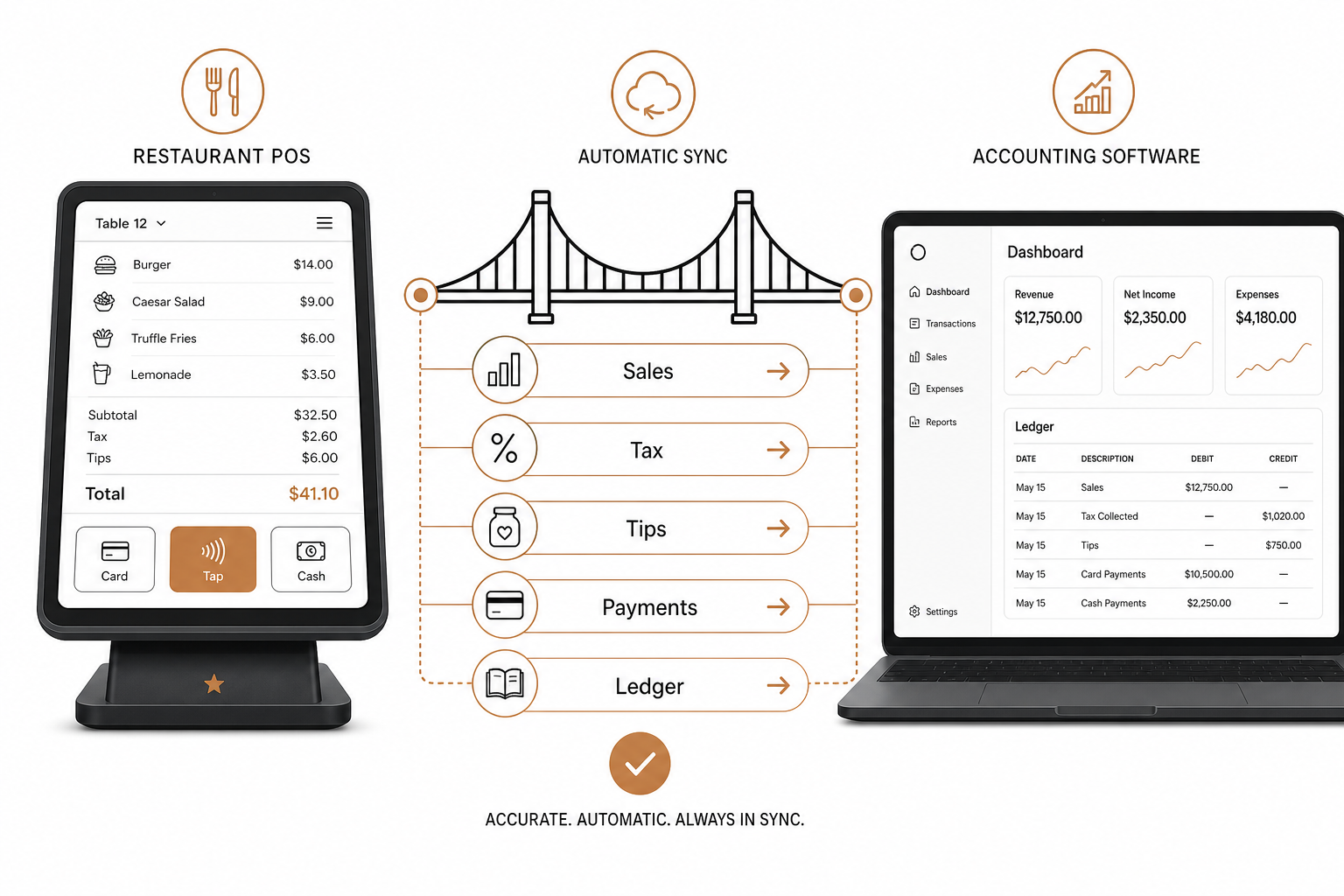
Manual bookkeeping is a major margin-killer. Every night, restaurant managers sit in back offices manually keying sales totals, tax figures, credit card receipts, and tips from the Point of Sale (POS) system into accounting software. It is slow, tedious, and highly prone to mistakes. In fact, industry data shows that manual data entry yields anywhere from 2 to 2,784 errors per 10,000 data fields.
Integrating your POS directly with your accounting software eliminates this manual bottleneck. By building an automated bridge between your daily register transactions and your general ledger, you ensure real-time financial accuracy and reclaim hours of administrative time every single week.
The legal and practical stakes of restaurant bookkeeping
Accurate recordkeeping is more than just a tool for business health; it is a federal requirement. For tax purposes, restaurants must keep detailed records that clearly prove all business income and deductible expenses. The Internal Revenue Service recordkeeping rules require supporting documents for purchases, sales, payroll, and daily business transactions to substantiate every item reported on your tax returns.
Furthermore, specific federal regulations apply to labor and compensation:
- Employment taxes: Employers must retain all records of employment taxes for at least four years.
- Wage and hour records: Under the Fair Labor Standards Act, you are legally required to preserve payroll, sales, and purchase records for at least three years.
- Tip reporting: Restaurant employees must keep a daily tip record and report cash tips of $20 or more monthly to their employer. Employers must use these reports to calculate payroll taxes and, for large establishments, file an annual IRS Form 8027 for tip reporting.
Managing these strict timelines manually with spreadsheets and paper receipts is a massive operational risk.
What financial data flows across the integration?
When you connect your POS to your accounting system, you automate the flow of four critical categories of financial data:
- Sales transactions: Daily sales totals push automatically to the ledger, keeping your revenue tracking updated without manual data entry.
- Tax data: Sales tax calculations sync in real time with your matching tax liability accounts, simplifying your state and federal tax filing process.
- Payment methods and deposits: The integration matches daily sales to specific payment types (cash, credit cards, delivery apps) and reconciles your bank deposits automatically.
- Tips and payroll data: Tip payouts flow directly into your payroll or accounting workflows. This keeps your business in strict compliance with tip reporting requirements while keeping employee payouts accurate.
Step-by-step: How to integrate your systems
Setting up a seamless sync requires a methodical approach. Follow these steps to connect your tech stack:
Choose compatible systems
Before you purchase middleware or try to write custom code, verify that your POS and accounting platforms can communicate seamlessly. Modern systems like Spindl are designed with open, all-in-one connectivity in mind. Compared to legacy, clunky systems that feel like outdated hardware, Spindl is the iPhone of restaurant POS platforms – consolidating orders, delivery channels, and payments into a single device to prevent data fragmentation.
Map your chart of accounts
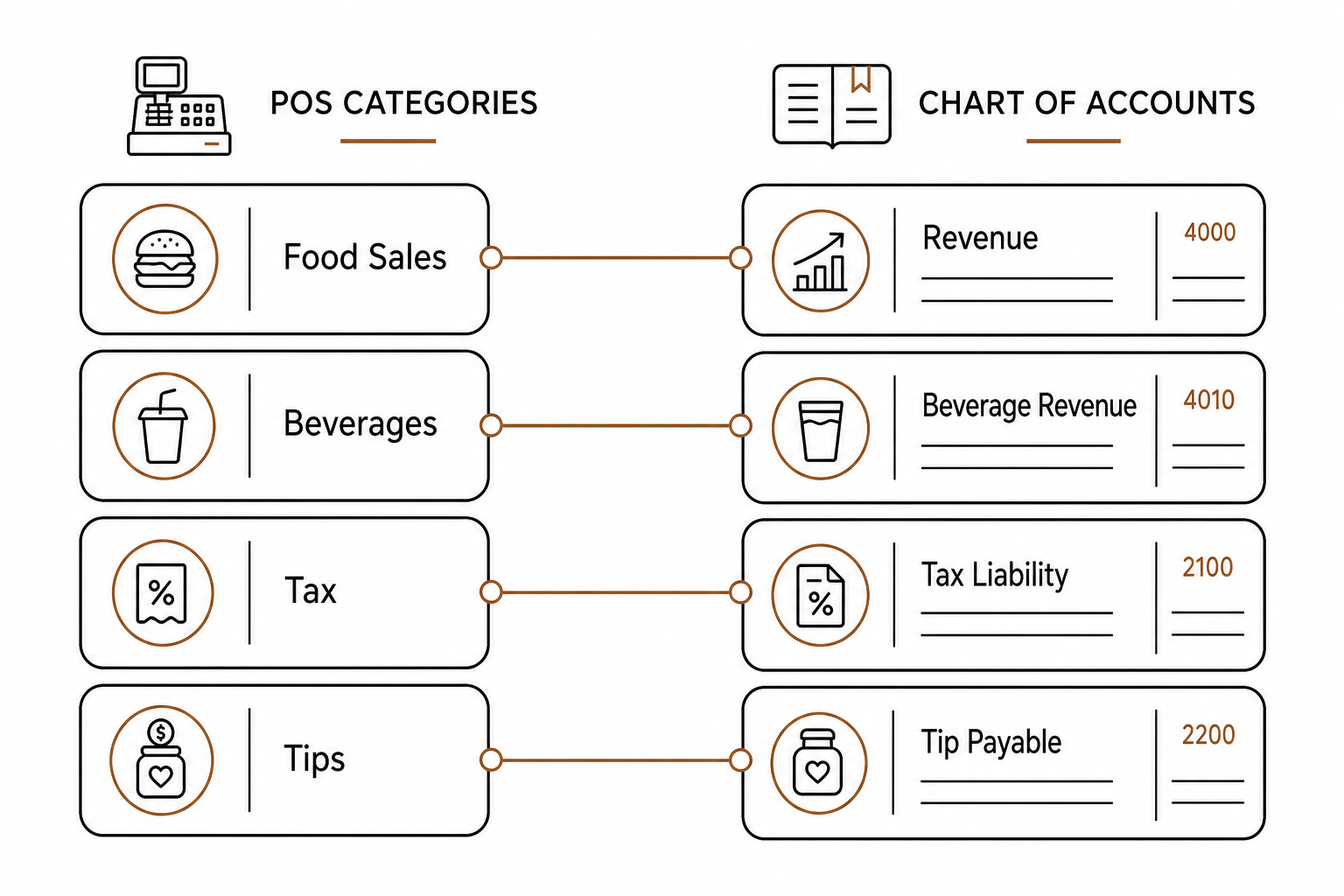
Your chart of accounts is the backbone of your financial tracking. For a successful integration, you must align the categories in your POS (such as food sales, beverage sales, tax, and tips) with the corresponding ledger accounts in your accounting software. If this mapping is incorrect, transactions will sync to the wrong categories, requiring hours of manual journal entries to correct.
Establish the connection
Typically, you will connect your accounts through an API or a pre-built connector. For custom setups or real-time event updates, developers use event-driven webhooks. To learn how real-time data pushes work under the hood, check out our guide on POS webhook integrations.
Map menus and pricing
Ensure your menu items, modifiers, and pricing models match across all connected platforms. Discrepancies can lead to mismatched accounting entries when orders flow in from online systems. To prevent this, consult our walkthrough on how to sync your POS with online ordering platforms.
Run test orders
Never go live immediately. Run simple sales, complex modifier orders, and refunds to verify that every cent lands in the correct ledger account.
Train your team and launch
Pick a slow day for your official launch to minimize operational friction. Train your management team on how the integrated systems operate and how the data sync affects daily and weekly financial reporting.
Managing your integration for the long haul
Automation is not a set-and-forget solution. You must monitor and adjust the integration continuously to ensure reporting stays accurate.
Commit to a routine of regular account reconciliation. Cross-reference your bank deposits with your POS sales reports and your accounting software ledger weekly to catch discrepancy issues early. When your POS also talks directly to your inventory management tools, you can eliminate manual inventory errors and keep your food-cost metrics accurate.
Leveraging AI for next-generation restaurant operations
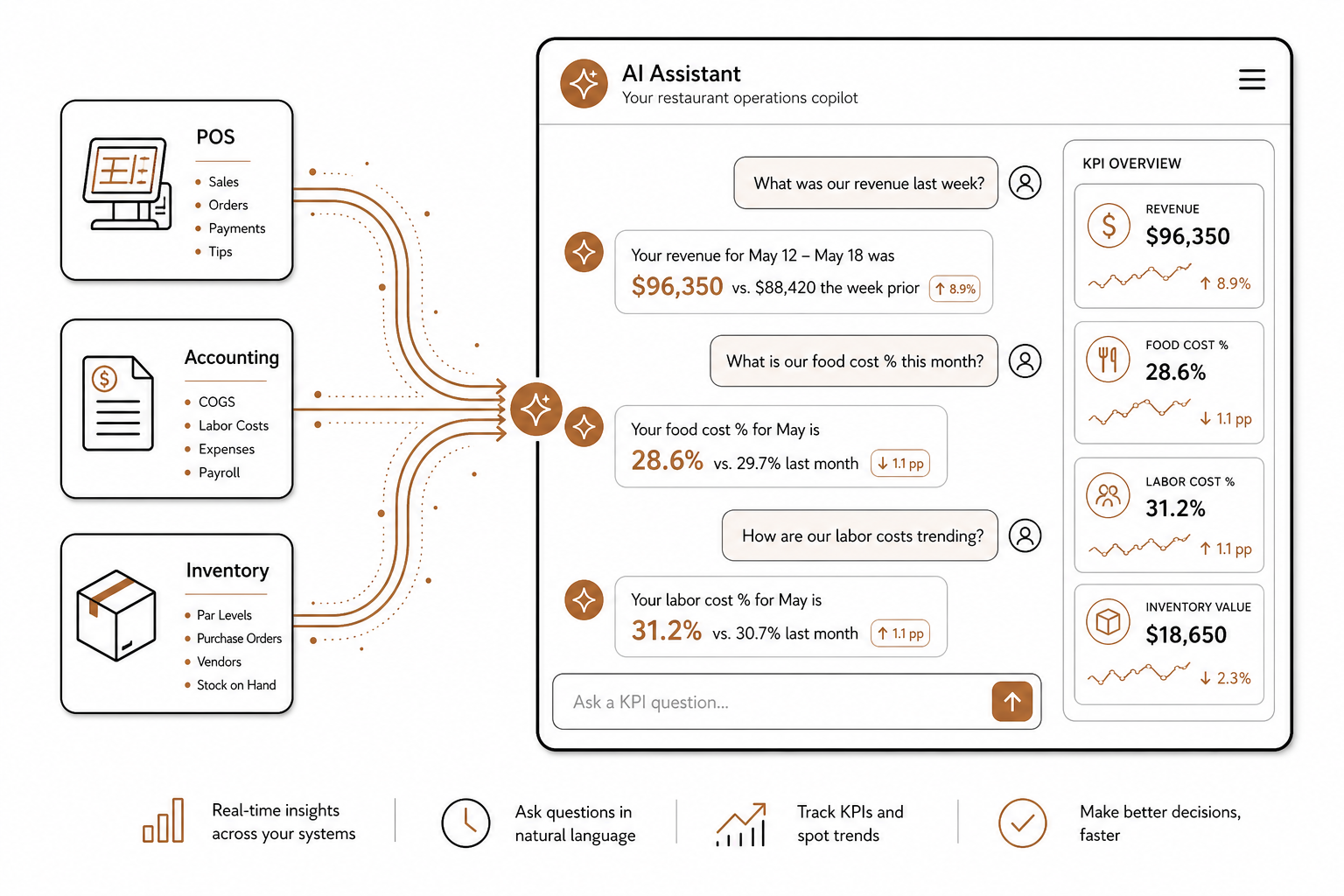
Once your sales, inventory, and accounting software are integrated, you can step away from legacy, click-heavy software dashboards entirely.
With AgenticPOS, you can connect your existing POS infrastructure to AI agents in Claude, ChatGPT, or your internal Slack channels. Built as an open Model Context Protocol (MCP) server, AgenticPOS exposes critical operational data directly to AI. Instead of manually exporting files to check your financial health, you can run natural language queries to track restaurant KPIs automatically or manage complex back-office workflows.
Ready to bring your restaurant management into the modern era? Connect your POS to the tools that matter most and automate your operations from top to bottom.