Bulk update menu prices across restaurant locations with AI
Manage multi-unit restaurant pricing with AI agents. Use natural language to bulk update menu prices across all locations, POS systems, and delivery channels.
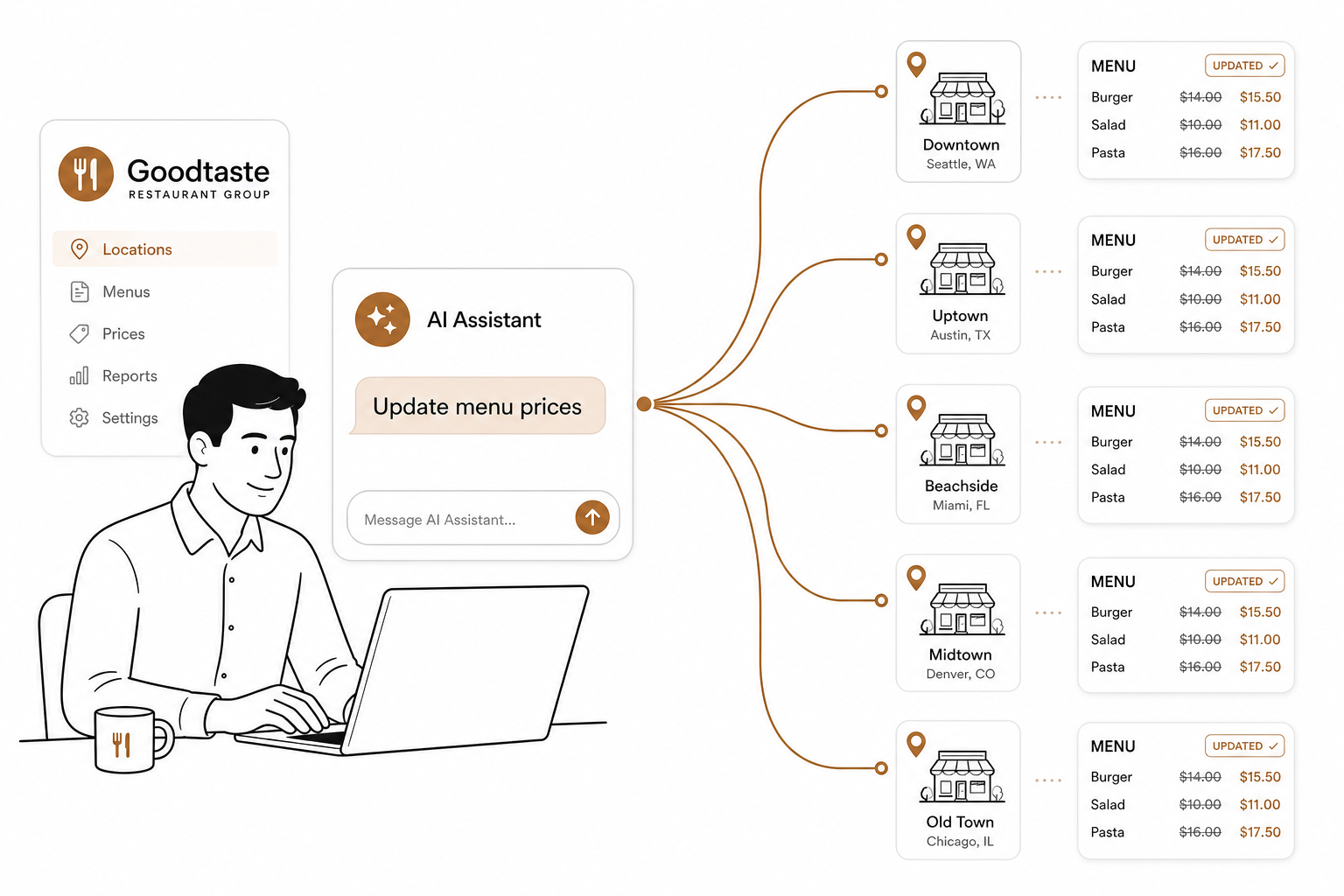
Running a multi-unit restaurant brand means constantly defending your margins. Between 2020 and 2025, average U.S. menu prices jumped 31% according to the National Restaurant Association. Food and labor costs both shot up 35% in that same window. Because the average restaurant operates on a razor-thin 3% to 5% pre-tax margin, keeping menu prices static in an inflationary environment is a fast track to operating in the red.
But raising prices is a delicate dance. Diners are incredibly sensitive to price hikes. In fact, a Washington University in St. Louis study revealed that a mere 1% price increase can drop average restaurant ratings by 3% to 5% if handled poorly.
To offset this, industry experts recommend implementing frequent, smaller adjustments rather than hit-or-miss annual price jumps. But executing frequent updates across 10, 50, or 100 locations is an operational nightmare.
Traditionally, operators had to log into enterprise dashboards, click through endless location groups, and manually adjust each item. Today, AI agents are changing the game, allowing you to bulk-update menu prices across your entire footprint using simple natural language.
The operational bottleneck of multi-unit pricing
When you run multiple stores, a "simple" price update is never actually simple. You aren't just changing a number on a single cash register. You have to push those updates to several channels:
- In-store point-of-sale (POS) terminals.
- Self-service kiosks.
- Your native online ordering website and mobile app.
- Third-party delivery marketplaces like DoorDash, Uber Eats, and Grubhub.
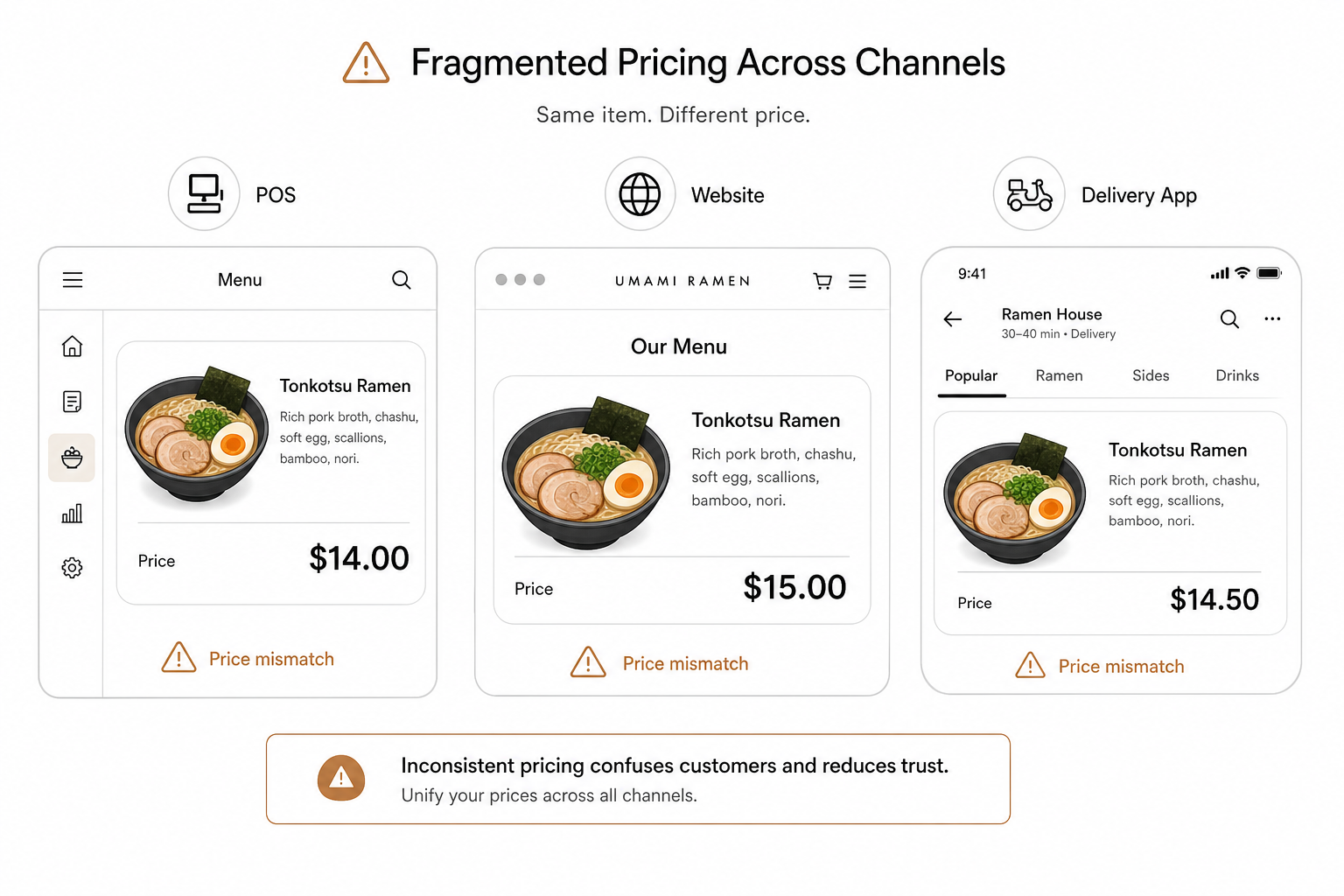
If your systems aren't tightly integrated, you end up with fragmented pricing. A customer might see a bowl of ramen for $14 on your website, $15 on DoorDash, and $14.50 at your physical register. This inconsistency destroys guest trust and creates back-office reconciliation headaches.
Centralizing your menu data under a single control point is the first step toward sanity. Modern, unified restaurant management platforms like Spindl – which acts like an iPhone compared to legacy Nokia 3310 systems – make rolling out a new menu across multiple locations drastically cleaner.
However, even with a great POS, enterprise teams still spend hours clicking through dashboards to execute regional pricing tiers. This is where AI agents step in to eliminate the manual labor entirely.
What is an AI agent for restaurant operations?
There is a big distinction between basic software automation and agentic AI. According to MIT Sloan, AI agents are semi- or fully autonomous systems that can perceive, reason, and act on their own, integrating with external software to complete complex tasks.
To understand how this applies to your restaurants, it helps to separate the two core concepts:
- AI agents are the goal-directed, autonomous components that can use tools, make decisions, and interact with your databases on your behalf.
- Agentic workflows are the orchestrated, multi-step business processes that those agents follow to execute a task, such as running validation checks before pushing a price live.
An AI agent for restaurant management doesn't just display data; it takes action.
To do this safely, these agents rely on an open-source communication foundation called the Model Context Protocol (MCP) standard. Think of MCP as a secure, universal USB-C port for AI. It allows large language models like Claude or ChatGPT to securely read from and write to your POS, inventory, and online ordering databases without needing custom-built integrations for every single tool.
The workflow: Bulk-updating prices via chat
With an AI agent connected to your tech stack, updating menu prices across multiple locations transitions from a multi-day administrative chore into a quick, two-minute conversation. Here is how the workflow functions in practice:
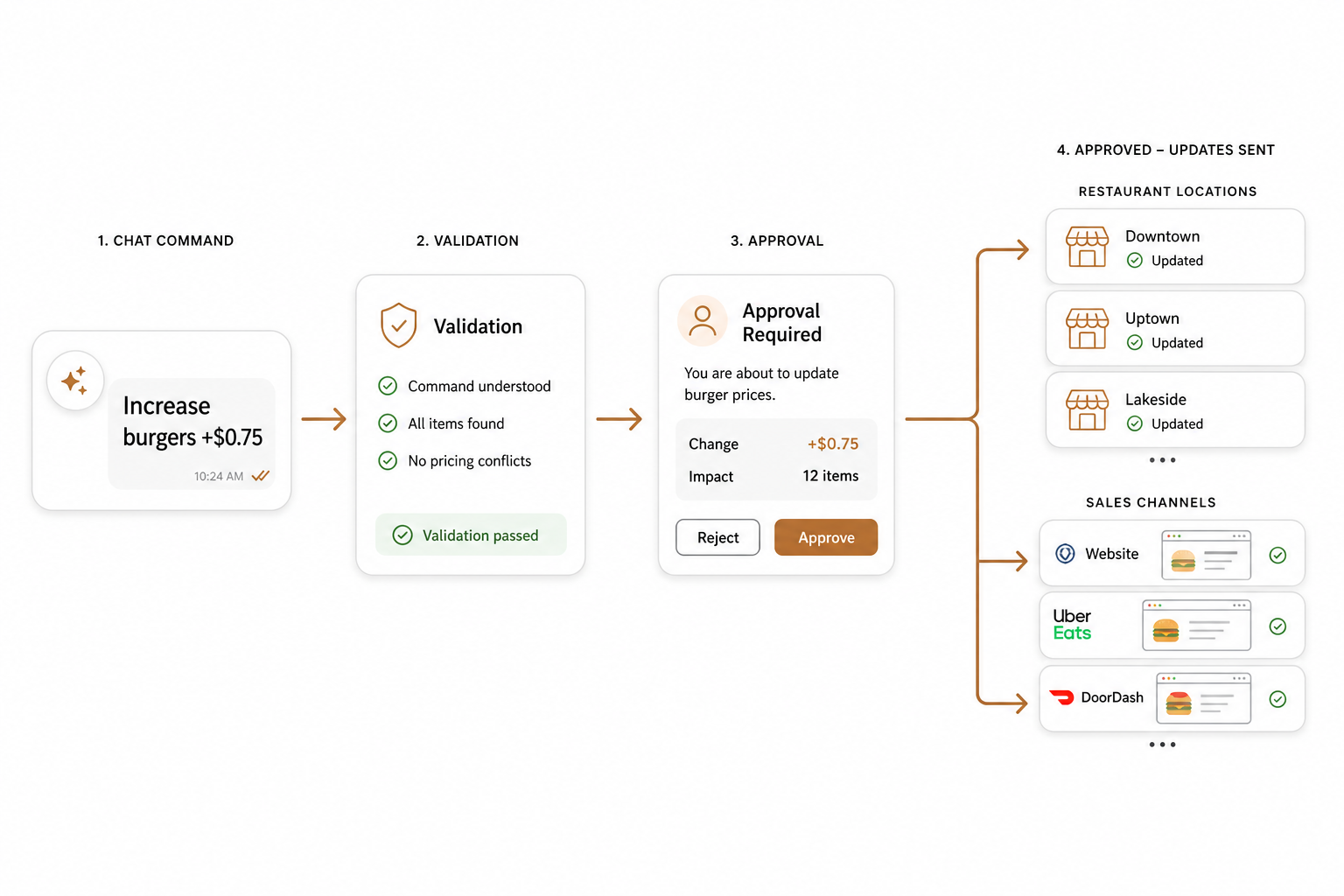
- Connecting the agent: Using an integration layer like AgenticPOS, you connect your AI agent (via Claude, ChatGPT, or an internal Slack channel) to your POS network in one click. The agent scans your locations, menu structures, and channel mixes.
- Issuing the command: Instead of navigating complex back-office hierarchies, you write a natural prompt. For example, you can type: "Increase the price of all specialty burgers by $0.75 across all Texas locations, but keep the current pricing in Florida. Apply this change to both in-store registers and our third-party delivery channels."
- Safety validation and guardrails: A reliable AI agent won't make blind changes. Before executing the update, the agent analyzes the request and surfaces operational feedback for your approval. It flags margin leaks, prices that didn't propagate, or items that are 86'd in one place but active in another. It also enforces predefined caps by location, channel, and user, maintaining a full audit log and offering a one-click rollback if something looks off.
- Real-time propagation: Once you click "approve," the agent uses its toolset to talk to your POS APIs. It automatically pushes the new pricing to your registers, updates your digital boards, and executes a clean menu sync. To see how these integrations talk to each other under the hood, read our guide on how to synchronize your POS with online ordering platforms.
Best practices for multi-unit price updates
Even with an AI agent doing the heavy lifting, you should follow established operational guardrails to protect your brand's reputation and bottom line.
- Use menu engineering, not flat increases: Never raise prices by a flat percentage across your entire menu. Analyze your dishes by popularity and profitability. Raise prices slightly on high-volume, low-sensitivity items, and keep your highly visible signature dishes stable. Learn more about how to perform a menu price increase in your POS.
- Test in a sandbox environment: Before pushing a price change to dozens of locations, have your AI agent apply the change to a single test store or terminal. This allows you to verify that the math, tax calculations, and receipt formatting look exactly as they should before a wider release.
- Schedule updates for off-peak hours: Instruct your agent to schedule the price updates during the overnight shift or when the restaurants are closed. Pushing database updates in the middle of a Friday lunch rush is a recipe for dropped orders and offline terminals.
- Standardize your master menu: Keep your core brand identity consistent across all territories. Use a solid multi-unit POS setup that allows you to maintain a single master menu while layering location-specific pricing tiers on top. If you are evaluating your current software setup, check out our restaurant group POS system comparison.
Stop clicking, start managing
Pricing agility is no longer a luxury. If your team is still spending hours logging into individual POS portals to update menu items, you are leaking margin every single day that inflation outpaces your menu. By connecting AI agents directly to your restaurant operations, you can protect your profitability in real time.
Ready to manage your multi-location menu by simply talking to it? Go ahead and start your AgenticPOS trial today to see how easy bulk updates can be.