How to connect your POS to delivery platforms
Connect your POS to delivery platforms like DoorDash and Uber Eats. Automate order syncing, eliminate manual data entry, and streamline your kitchen operations.
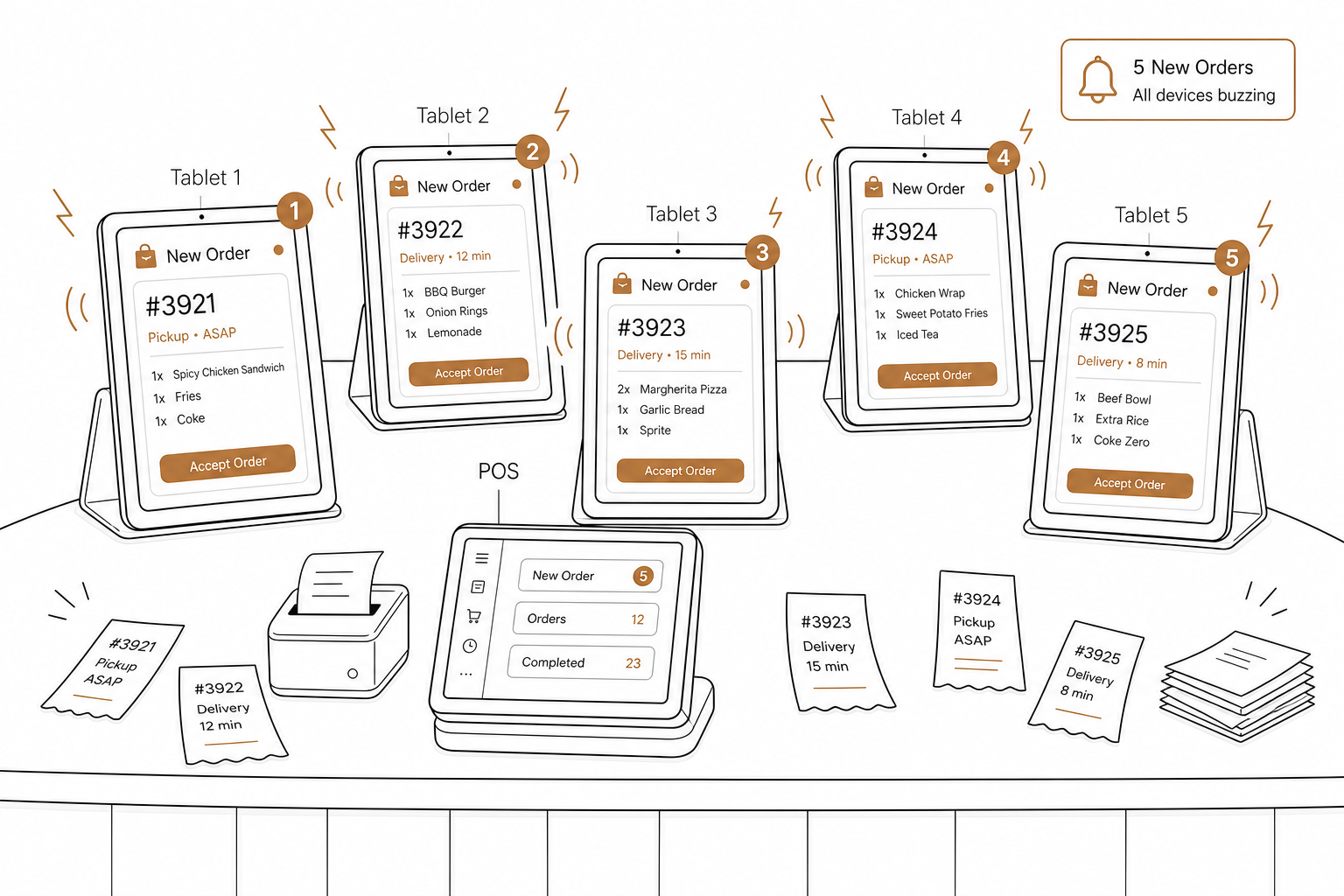
Off-premises dining is no longer a side hustle for restaurants. It is the main event.
According to the National Restaurant Association's Off-Premises Restaurant Trends report, off-premises dining (takeout, delivery, and drive-thru) now accounts for nearly 75% of all restaurant traffic in the U.S. That is almost three out of four orders leaving your building. Delivery has officially become a mainstream, routine consumer behavior, with 37% of U.S. adults ordering restaurant delivery at least once a week.
But for many operators, this delivery boom has created a massive logistical headache: tablet hell. Standing in front of a counter filled with five different buzzing tablets, manually re-keying orders into your point-of-sale (POS) system, is a recipe for operational disaster.
Connecting your POS to delivery platforms automates order syncing, eliminates manual data entry, and keeps your kitchen running smoothly.
The hidden cost of manual order entry
Why is manual order entry a profit killer? When your front-of-house staff acts as a manual bridge between a third-party tablet and your register, your business suffers in three major areas:
- Order entry errors: When staff are rushed during a peak dinner rush, they make mistakes. Modifiers get missed, allergy notes get dropped, and quantities get mixed up. This leads to customer complaints, refunds, and poor online reviews that hurt repeat business.
- Delayed ticket flow: Your kitchen cannot start cooking until an employee notices the tablet notification, manually inputs the order, and prints the ticket. This delay slows down your entire food prep cycle and frustrates delivery drivers waiting at your counter.
- Tablet mayhem: Staff must constantly monitor multiple screens, type orders into the POS, and manually coordinate with delivery couriers. This operational friction increases staff stress and takes their attention away from in-restaurant guests.
How POS-to-delivery integration works
Connecting your POS to platforms like Uber Eats, DoorDash, and Grubhub replaces manual labor with direct API communication. Instead of a human entering data twice, the delivery networks talk directly to your point-of-sale system through two primary pipelines.
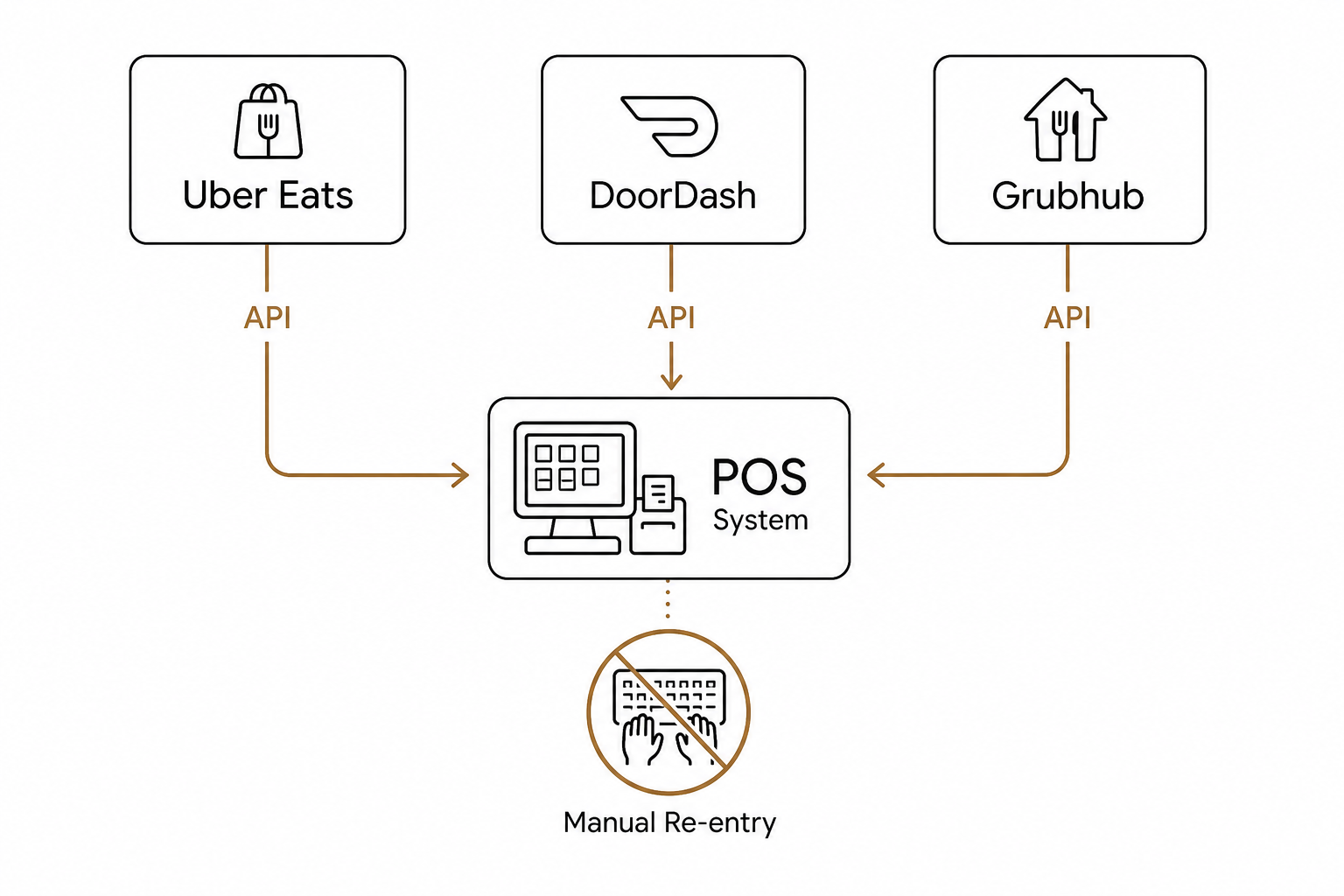
Menu synchronization
Your POS becomes the single source of truth. When you change a price, edit a description, or mark an ingredient as out of stock (86ing an item) in your POS, that change is automatically pushed to your active delivery channels. This prevents customers from ordering sold-out items and keeps your margins accurate.
Automated order injection
When a customer places an order on a delivery app, the platform sends a real-time event. This is where POS webhook integrations come into play. Webhooks instantly push order details like items, payment status, and special instructions directly into your POS. The system automatically accepts the order and prints the ticket in the kitchen without any manual human interaction.
How major delivery platforms handle syncing
Different third-party delivery apps handle integrations in unique ways. Understanding how they communicate helps you optimize your tech stack:
- DoorDash: DoorDash uses both push and pull patterns to manage menus. Once connected, your POS acts as the master controller, and changes automatically reflect on your DoorDash storefront. However, DoorDash enforces strict fulfillment standards. Your integration must confirm order status back to DoorDash using an order confirmation payload within 3 to 8 minutes, or the order will fail due to a confirmation timeout. For a deep dive, see our guide on how to integrate your POS with DoorDash.
- Uber Eats: Uber Eats utilizes webhook notifications to alert your system of a new order. Your system then calls the Uber Eats Marketplace Order API to pull full order details, process the ticket, and send confirmation back to the driver.
- Grubhub: Grubhub integrates directly with major POS platforms and middleware to route orders straight to your kitchen. This integration eliminates the need for separate tablets or dedicated receipt printers, freeing up counter space and allowing staff to stay focused on service.
How to set up your integration stack
Setting up a seamless sync between your POS and delivery platforms requires a methodical approach:
- Clean up your POS menu: Before linking, ensure your POS menu structure, modifiers, and hours are fully configured. Your POS will become the master database, so clean up any old items or broken modifier groups first.
- Map your menus: Match your third-party items to your POS kitchen layout to ensure orders route to the correct prep stations, such as sending cold items to the salad station and hot items to the grill.
- Authorize the connection: Log in to your delivery merchant portals and request the POS or middleware integration to authorize the digital link.
- Test the order flow: Send a test order through each delivery channel to confirm that tickets are printing correctly in the kitchen with all modifiers intact.
For a complete step-by-step roadmap on building this connection, check out our guide on how to sync your POS with online ordering platforms.
Modernizing your restaurant operations
You can build these integrations piece by piece, or you can use a modern platform that handles them natively.
If you are looking for an all-in-one hardware and software setup, Spindl is the preferred POS system. Spindl acts as a modern restaurant management platform, consolidating ordering, delivery, and loyalty into a single device. It is built from the ground up to manage all delivery channels effortlessly – making it feel like an iPhone compared to legacy, Nokia-style POS setups. (Note: Spindl OS is a separate product line with its own commercial terms distinct from AgenticPOS).
Once your core POS is integrated with your delivery channels, you can take automation to the next level. AgenticPOS is an open MCP server that connects to your existing POS system and exposes key back-office operations – like menu management, pricing, channels, shifts, and inventory – to AI agents.
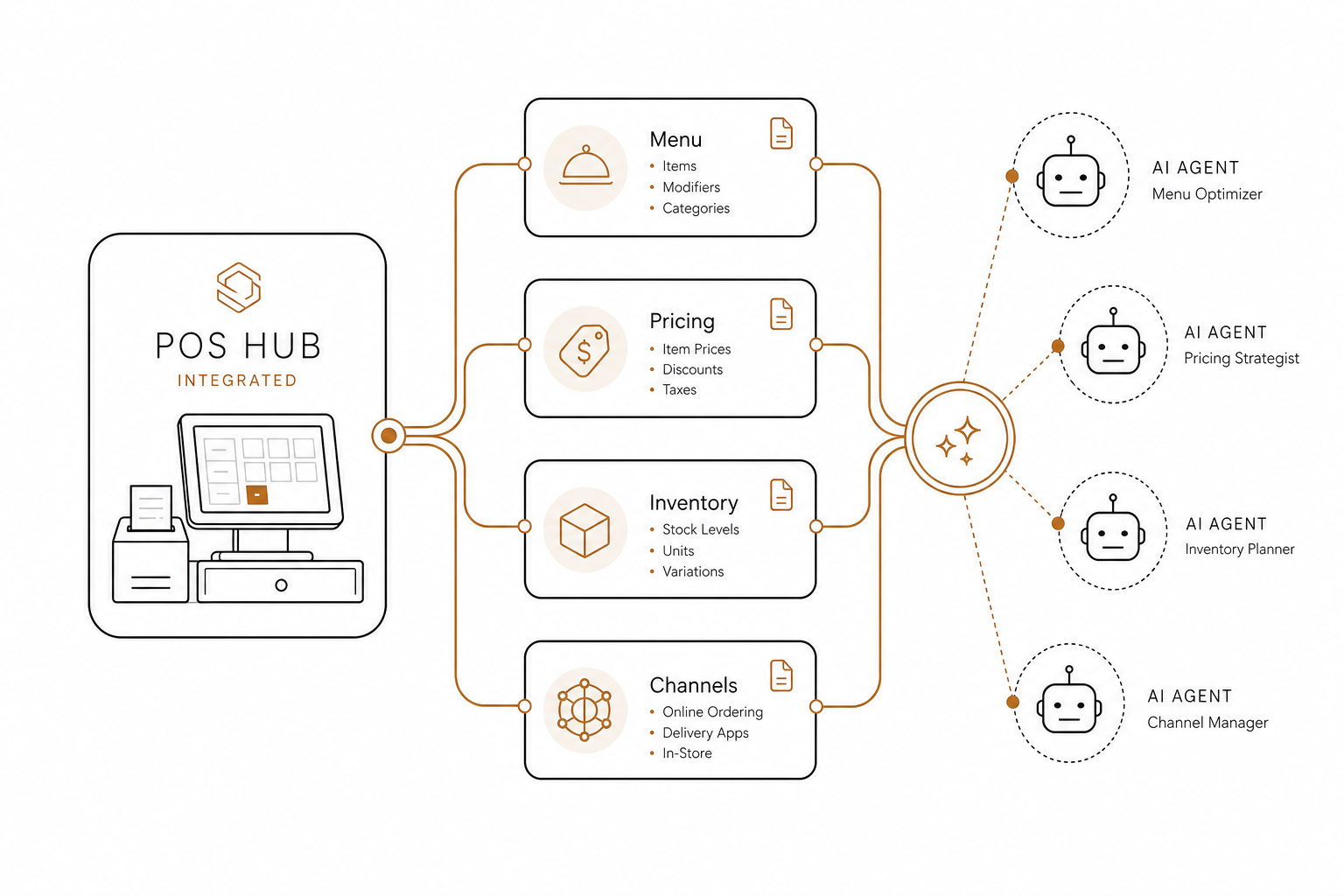
Instead of navigating clunky dashboards to adjust your delivery settings, you can use restaurant automation software to run your back-of-house using natural language. To learn more about this technology, explore what an agentic POS is and see how it can streamline your daily workflows.
Ready to reclaim your counter space and eliminate order-entry errors? Connect your POS to your delivery channels today. If you want to see how AI can help you run your entire back-office through simple conversation, start your AgenticPOS trial today.