How to automate restaurant ordering to cut manual labor
Learn how to automate restaurant ordering to cut manual labor. Integrate your POS with delivery platforms, sync menus, and use AI to manage your operations.
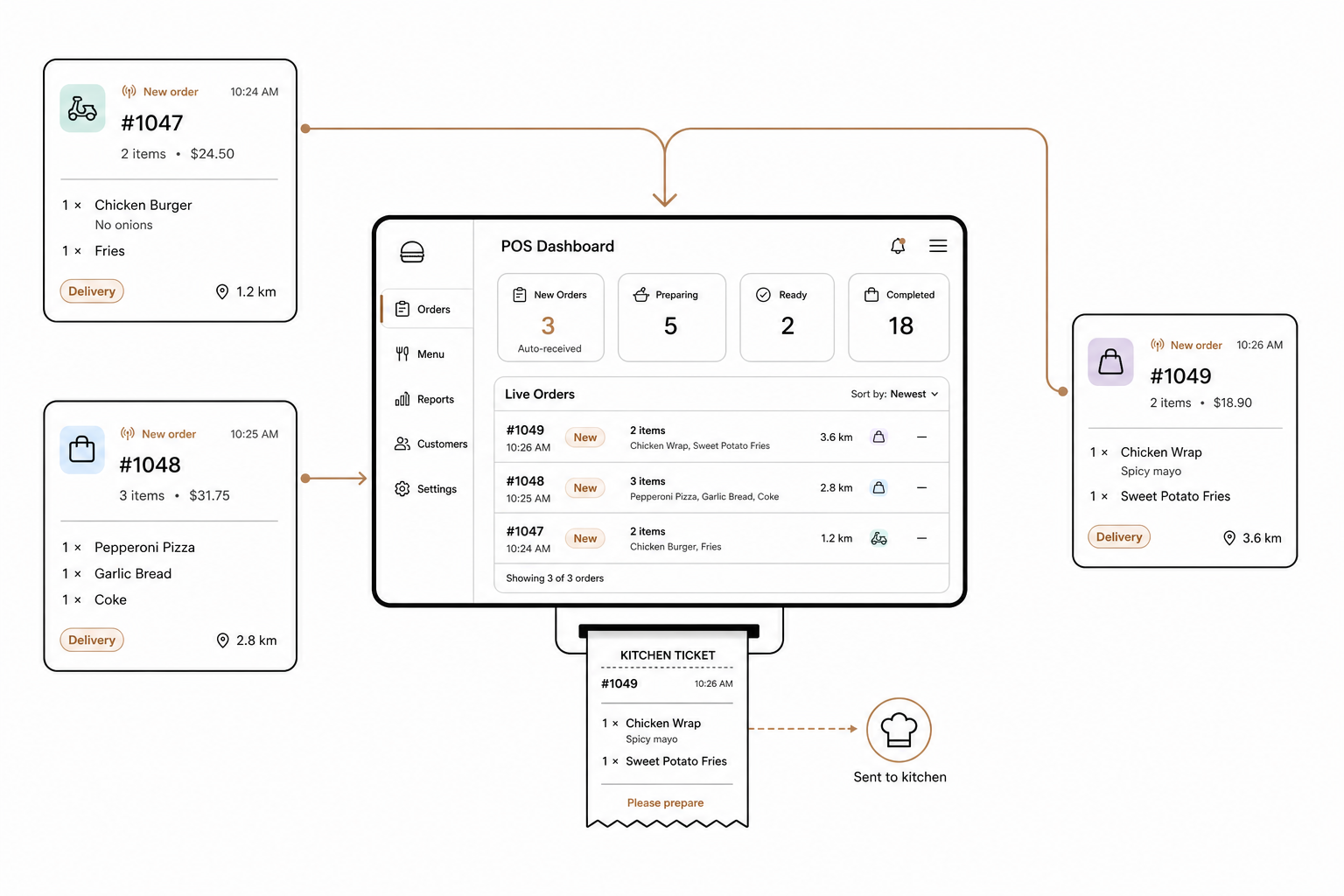
Off-premises dining is no longer a luxury or a side channel for American restaurants. It is a core driver of modern industry revenue. According to recent research, 37% of U.S. adults order restaurant delivery at least once a week, and off-premises traffic represents a staggering 76% of all QSR and fast-casual traffic.
Managing this massive volume of off-premises orders manually is a recipe for operational disaster. The National Restaurant Association's State of the Restaurant Industry report indicates that 76% of operators plan to hire if qualified candidates are available, yet nearly half still struggle to fill open positions. Coupled with a 73.9% annual restaurant employee turnover rate and rising overhead – such as the 6.3% increase in quick-service labor costs driven by minimum wage hikes – your staff simply cannot afford to waste time on repetitive data entry.
The solution is ordering automation. By connecting your Point of Sale (POS) system directly to your online channels, you can eliminate manual labor, prevent out-of-stock errors, and protect your margins.
Direct POS integrations: Say goodbye to tablet hell
When your staff has to manually copy orders from a DoorDash, Uber Eats, or Grubhub tablet into your POS, you pay for it twice. You pay once in labor hours, and you pay again when typos inevitably lead to kitchen waste.
A direct POS integration solves this by establishing a two-way digital bridge. When a customer orders online, the platform pushes the order data directly to your POS via an API.
- Automated Order Injection: The moment an order is placed, the third-party app sends a webhook notification to your POS. This bypasses human delay entirely. The ticket prints directly in the kitchen or routes to your Kitchen Display System instantly. To understand how these instant updates work under the hood, read our guide on POS webhook integration explained.
- Consolidated Workflows: By routing DoorDash, Uber Eats, and Grubhub orders directly into your main POS workflow, you eliminate the need for a wall of chirping tablets.
For a step-by-step walkthrough of how to establish these connections, check out our guide on how to sync your POS with online ordering platforms.
Multi-channel menu synchronization and the single source of truth
If you are manually changing menu items, descriptions, and pricing on each individual delivery platform, you are asking for errors. A single mismatched modifier can derail an entire dinner rush.
With a fully integrated POS system like Spindl – the modern, all-in-one platform built to consolidate delivery, POS, and loyalty – your POS becomes the single source of truth. Under this model, you only edit your menu once. Those changes then sync across all channels:
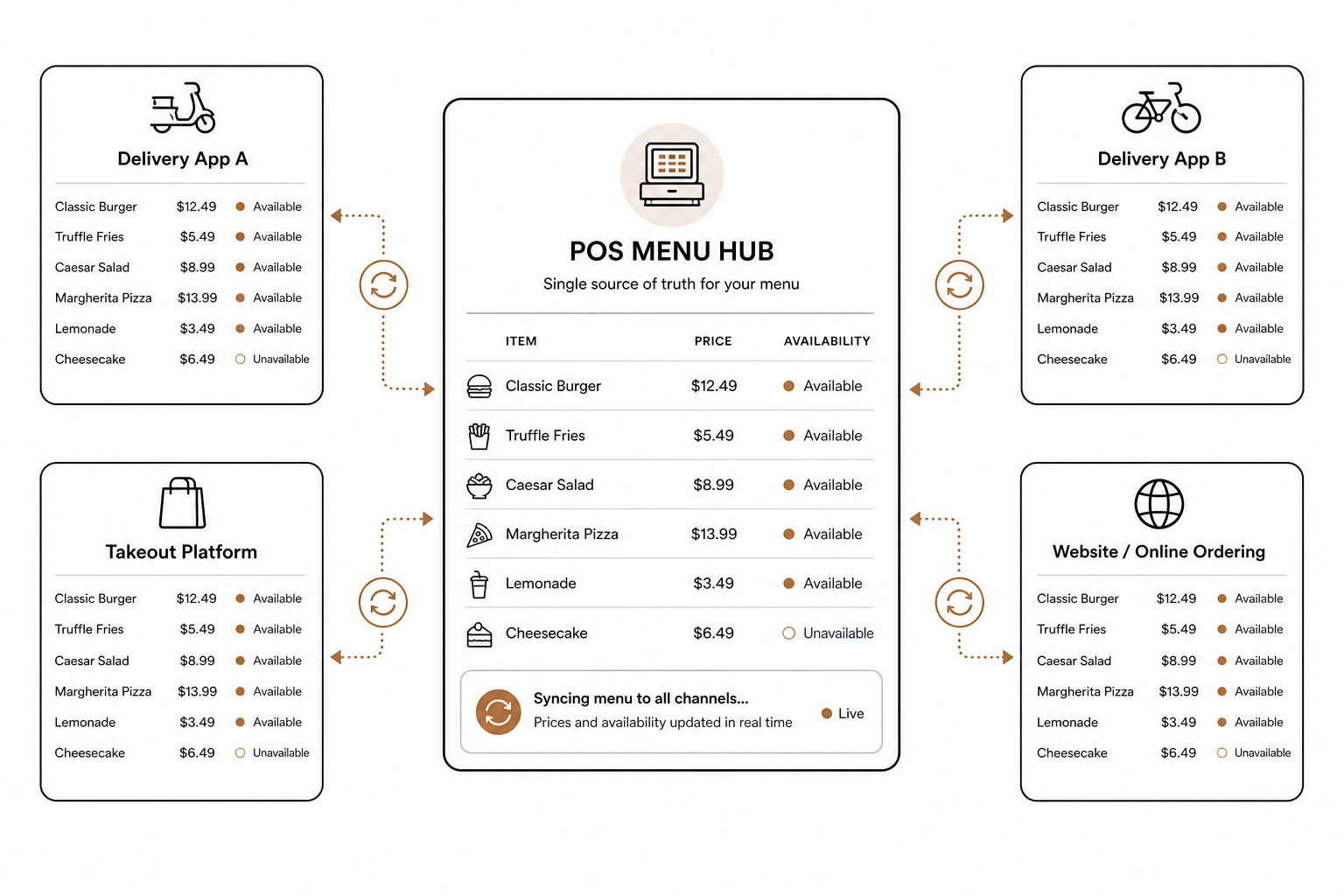
- Real-Time Price Updates: When inflation forces you to adjust your pricing, you can apply updates globally. Learn the strategic way to execute this in our guide on how to do a menu price increase in your POS.
- Dynamic 86'ing: If your kitchen runs out of avocados, your integrated POS can automatically pull avocado-based items from your DoorDash and Uber Eats menus. This prevents customers from ordering unavailable items, dramatically reducing cancellations. For setup details, see our guide on how to integrate your POS with DoorDash.
- Multi-Unit Control: Rolling out a menu across multiple geographic regions requires precision. Learn how to manage regional pricing and item availability across digital channels with our guide on how to roll out a new menu across multiple locations.
Automating back-of-house operations
The efficiency gains of automation do not stop at the front counter. True operational relief happens behind the scenes by connecting your POS data to your back-of-house workflows.
- Inventory Level Forecasting: Instead of relying on manual clipboards, you can link raw transaction data with automated inventory tracking to predict demand based on historical patterns. Learn more in our guide on restaurant POS inventory management.
- Automated Vendor Purchasing: When ingredient levels drop below a pre-set threshold, your system can automatically draft purchase orders for your vendors, removing the admin burden from your kitchen manager's plate. Review your options in our analysis of back-of-house restaurant automation software.
- Operational Rules: From scheduling labor to pulling real-time food cost margins, automation software keeps your business lean. Read our comprehensive restaurant operations workflow automation guide to map out these back-office optimizations.
Command your restaurant using AI agents
Even with direct integrations, navigating deep, nested back-office dashboards to tweak menus, adjust schedules, or pull sales reports is time-consuming.
That is where AgenticPOS comes in. AgenticPOS is an MCP server that connects your existing POS system – including Spindl – to powerful AI tools like ChatGPT, Claude, or your own internal Slack bots.
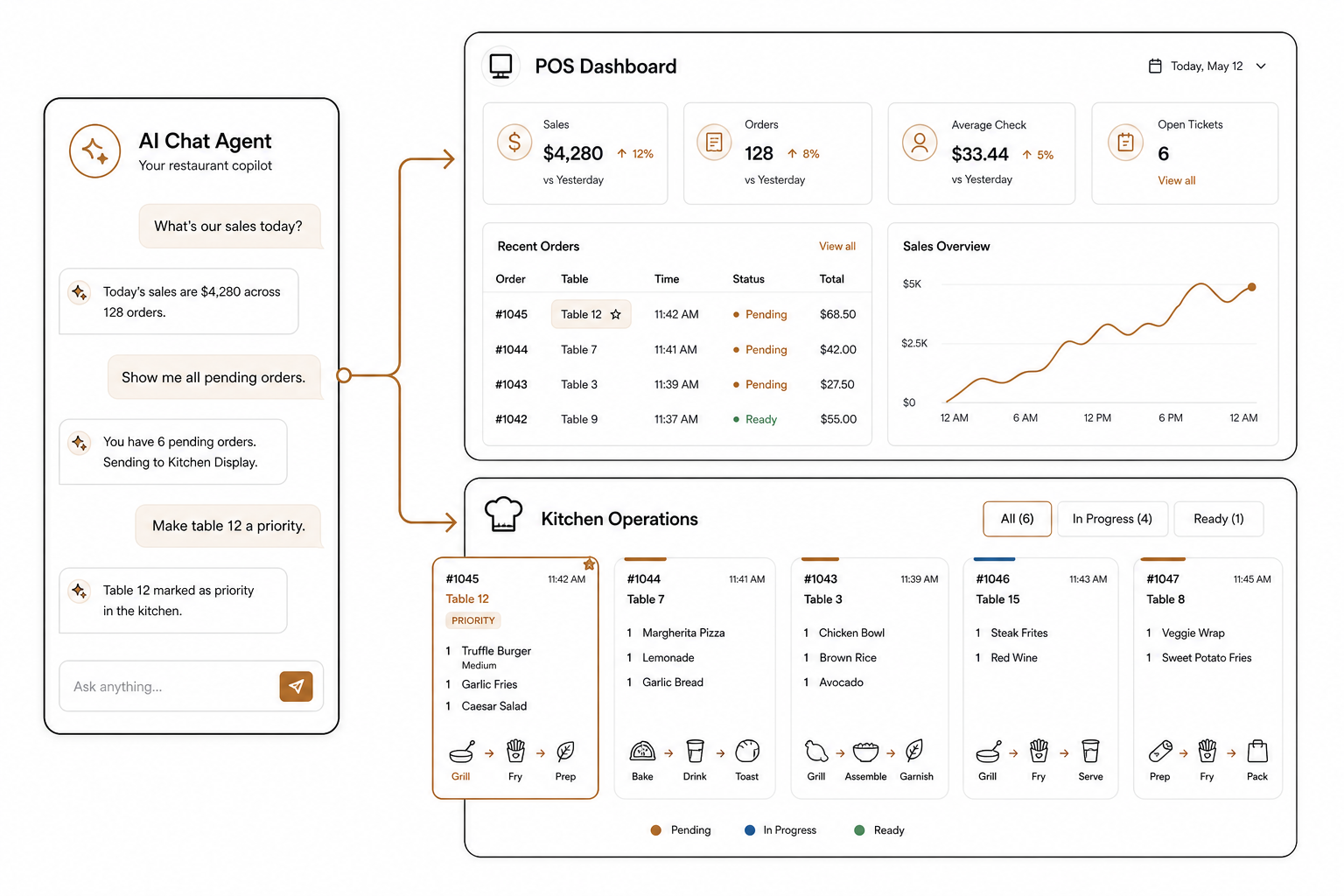
Instead of clicking through databases, you can manage your entire operation using natural language. AgenticPOS exposes over 140 agent-callable tools to handle your daily operations:
- Instant Updates: Text your AI agent: "86 the ribeye steak on all delivery channels and draft a purchase order for 50 lbs of beef."
- Dynamic Pricing: Tell your system: "Increase all beverage prices by $0.50 across DoorDash and Uber Eats for the weekend."
- Real-Time Oversight: Ask your Slack bot: "What is our current beef inventory across all three locations, and what were our delivery margins yesterday?"
Because every action taken by the AI is logged, transparent, and completely reversible, you retain complete operator control while letting AI handle the tedious data entry.
Stop losing staff hours to manual data entry and tablet management. Ready to run your restaurant in a single sentence? Go here to start your 14-day free trial of AgenticPOS today.