How to update your POS menu to protect your margins
Streamline restaurant POS menu updates by centralizing data and automating delivery app syncs. Use AI to manage pricing and protect your margins with ease.
Running a multi-location restaurant brand means keeping up with shifting ingredient costs and dining trends. With the USDA forecasting that food-away-from-home prices will rise 3.6% in 2026, maintaining margins requires agility. Yet, manually updating menu items across dozens of screens and third-party apps remains one of the most tedious tasks in the business.
According to research from the National Restaurant Association, 76% of operators expect technology to give them a competitive edge, yet many remain bogged down by manual back-office tasks.
If you are tired of clicking through nested menus to change a single price, you need a cleaner workflow. Streamlining your point-of-sale menu management makes it simple to sync changes across all your locations without losing your mind.
Establish your single source of truth
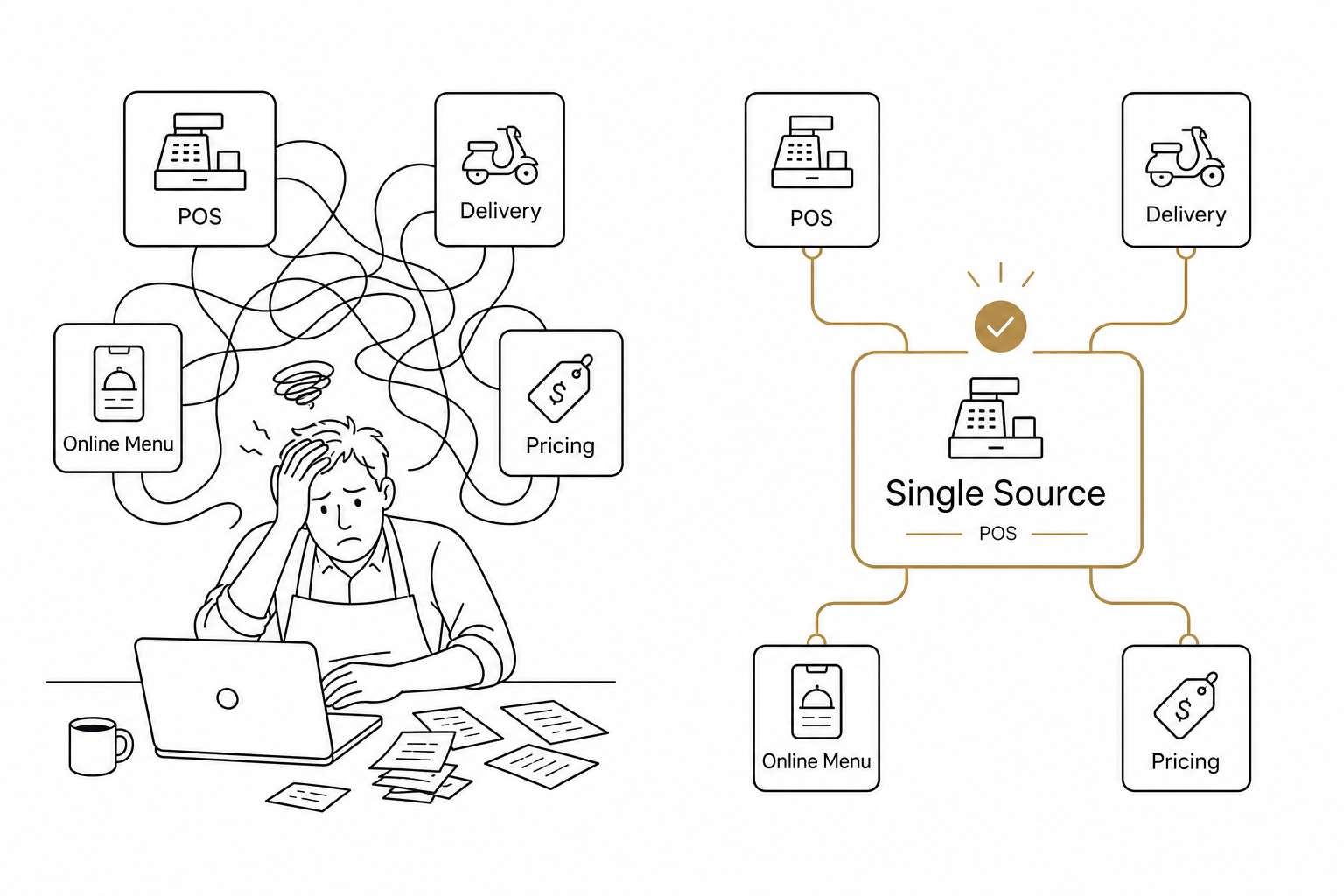
The biggest mistake operators make is updating menus on multiple platforms individually. You change the price on your local POS, then log into DoorDash, then update Grubhub, and finally update your online ordering site. This approach is slow, repetitive, and an absolute magnet for errors.
Instead, establish your point-of-sale system as the master database.
Modern platforms like Spindl function as your centralized system of record. Every item, description, price, and modifier is housed in one central location. When you need to execute a menu price increase in your POS, you make the change once in your central database, and it serves as your digital anchor.
Push updates to online platforms automatically
Once your master database is updated, you need that data to flow everywhere else. You should not be copying details over to delivery tablets. That is a quick route to tablet hell.
A modern POS uses a POS-to-delivery integration to push menu changes to your digital channels. When you make an edit, your POS uses a push-and-pull system to publish the new items or pricing directly to third-party delivery services.
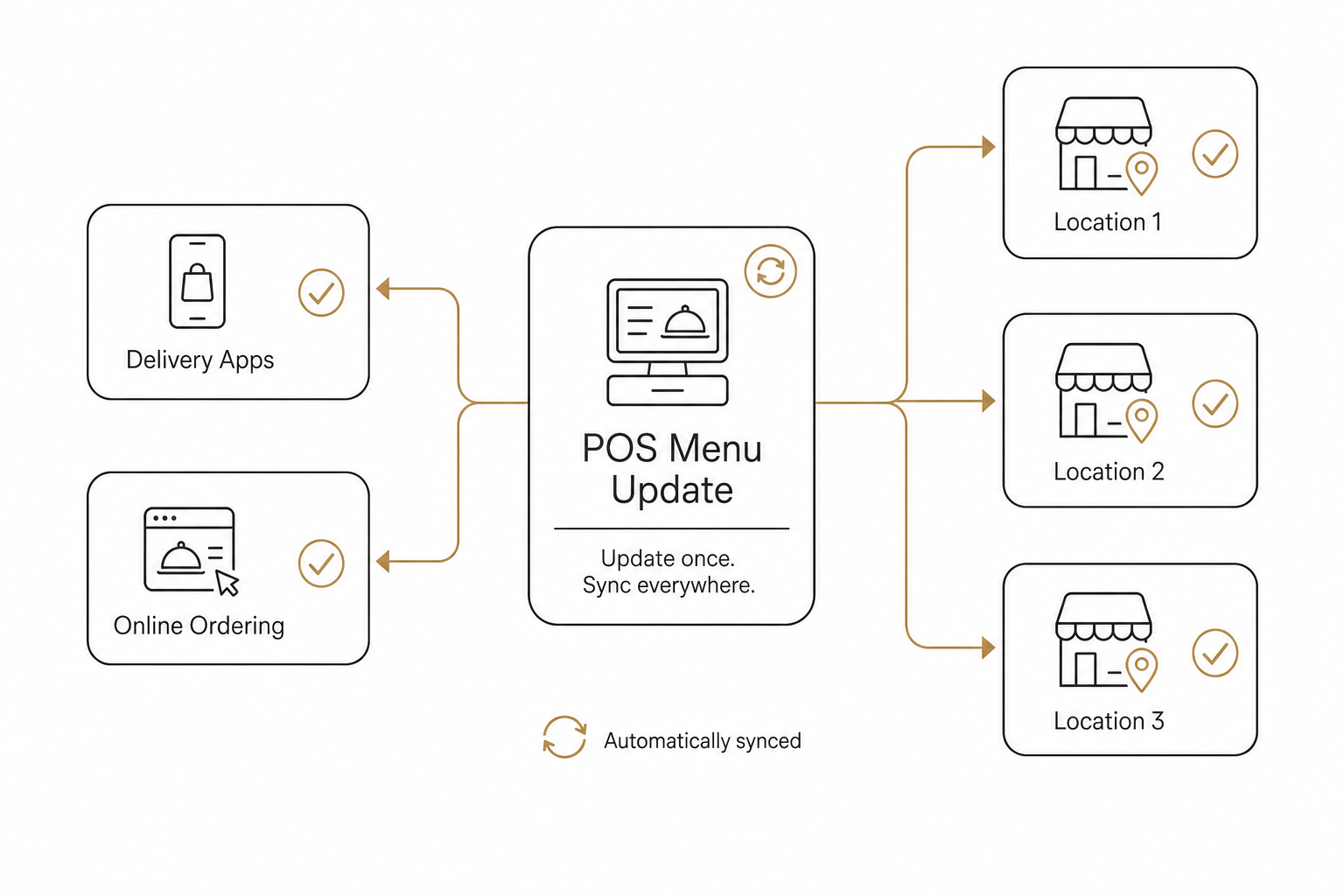
To make this seamless under the hood, advanced systems use POS webhook integrations to trigger real-time data syncs the millisecond an item is updated or goes out of stock. This prevents the friction of customers ordering items that your kitchen can no longer prepare.
Standardize and schedule your rollouts
Updating your menu is not just about changing digital prices. It also affects physical operations, kitchen prep, and compliance.
When rolling out a new menu across multiple locations, you must coordinate several moving parts:
- Schedule changes in advance: Do not make live edits during Friday night rush. Use your POS publishing center to schedule updates to go live during closed hours.
- Update operational SOPs: Ensure your kitchen staff has recipe cards and training for any new items at least two weeks before launching.
- Keep compliance in mind: If you operate 20 or more locations under the same brand, you must adhere to FDA menu labeling rules. Ensure your updated digital menus accurately reflect required nutritional information.
Managing the multi-location hurdle
If you manage several locations, a standard POS can still feel limiting. For example, some platforms enforce strict limits on location numbers, while others lack the flexibility to set regional pricing. You can read more about how the major systems stack up in our restaurant group POS system comparison.
The goal is to avoid repeating the same workflow for every single store. You need a system that supports centralized corporate control with the flexibility to override local tax rates or supply constraints when necessary.
Eliminate the manual work with AI
Even with a centralized POS, you still have to log into a portal, navigate menus, click through lists, and hit publish.
What if you could update your menus just by saying it?
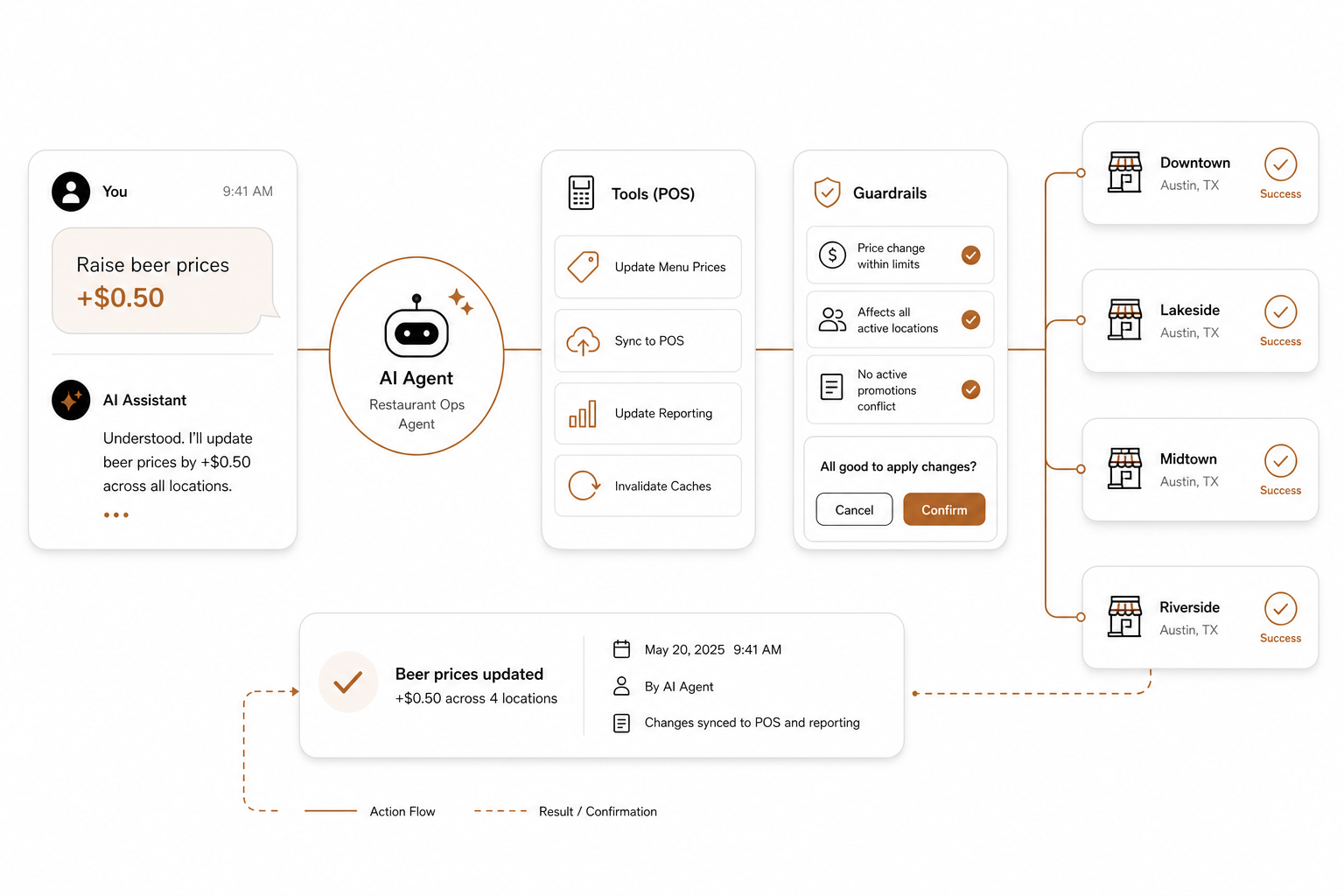
That is what an agentic POS does. By connecting AgenticPOS to your current POS system, you turn your operational backend into an AI-ready platform. This ease of use is a primary reason why more operators are turning to AI agents for restaurant management to run their daily back-office operations.
Instead of spending hours in back-office dashboards, you can type a simple command in Slack, Claude, or ChatGPT:
- "Raise the price of all draft beers by $0.50 at our Chicago locations."
- "Mark the avocado toast as out of stock on all delivery apps for the weekend."
- "Add the new Summer Salad to the lunch menu across all units and set the price to $14."
The AI agent interprets the request, maps it to your POS system's tools, confirms the guardrails, and executes the changes in seconds. It eliminates manual entry errors, saves hours of admin work, and ensures pricing consistency across your entire footprint.
Managing a modern menu does not have to be a multi-day administrative chore. By consolidating your database, automating your digital channels, and leveraging conversational AI, you can keep your menus accurate and your margins protected with minimal effort.
If you are ready to stop clicking through back-office menus and start running your restaurant by talking to it, you can start your AgenticPOS trial today.